
Earn ERE credits with your Alfen charger
Can I connect my Alfen to Joulo for ERE registration? Yes. Alfen Eve models are MID-certified by default and directly eligible for ERE. There are two routes: connect automatically through a cloud provider (50five or Eneco), or connect via OCPP with MyEve and Service Installer.
Careful • already connected to another OCPP backoffice?
Is your charger already configured to an existing OCPP backoffice (for example from your installer, charge-card provider or energy supplier)? Then be careful making changes. A charger usually connects to one backoffice at a time, so switching to Joulo disconnects that link and stops the services relying on it (public charging, expense reimbursement, monitoring). Not sure whether you're allowed to or want to change it? Check with your installer or current provider first.
How ERE credits work with Alfen
Every kWh you charge at home with renewable energy earns you ERE credits. Your Alfen charger's MID meter measures the exact energy usage and sends it to Joulo via OCPP. Joulo registers this at the NEa and you receive your payout • automatically, no paperwork.
Two ways to connect your Alfen
Pick the route that fits you: through your cloud provider, or directly via OCPP. Both deliver the same ERE registration.
Via a cloud provider (50five or Eneco)
Are you with 50five or Eneco? Then connect through that provider. No installer needed.
50five
Connect automatically with your 50five account.

Eneco eMobility
Connect automatically with your Eneco account.
Via OCPP
Not with 50five or Eneco? Connect directly via OCPP with the ACE Service Installer.
What you need
- ✓A Joulo account (free registration)
- ✓Your charger's Charge Point ID: the name on the top line in the ACE Service Installer
- ✓Service Installer access (ACE)
- ✓MyEve app and temporary charger network access
First: bring your charger online
How you do this depends on your model's age. You only need one of these two.
Before March 2023: install a network card
These older Alfen Single models usually have no WiFi. Open the charger with Service Installer access and place a network/SIM card so it can get online. This is the most technical part.
From March 2023: temporary WiFi via MyEve
Power-cycle the charger. You then get roughly 15 minutes of WiFi you can join with the MyEve app to bring the charger online.
Read the official MyEve explanationStep-by-step: connect via local WiFi (March 2023 and later)
- 1
Activate the charger's WiFi
Switch the charger off at the fuse box (in the meter cupboard) and back on after 20 seconds. The charger now broadcasts a local WiFi signal for 15 minutes.
- 2
Open the app
Open the MyEve app or the Eve Connect app on your smartphone.
- 3
Add a device
Tap the + (plus) icon to add a charger and choose to connect wirelessly.
- 4
Make the connection
Choose to log in manually instead of scanning the QR code (unless you have the password card to hand).
- 5
Login credentials
Enter your ACE number (the serial number) and the default password from your password card.
- 6
Select WiFi
Scan for nearby networks and select your own WiFi network. Enter its password to complete the connection.
Then: configure OCPP
Which steps you follow depends on your model number, on the type sticker: it starts with AHP or NG. The Joulo connect wizard asks for the Charge Point ID at the end, once you have the ACE Service Installer open. That is the name on the top line, not necessarily the ACE number on the sticker.
Download the Joulo firmware file
Every NG needs this, also when Joulo is already among the Back office presets: that preset only fills in the URL, the certificate is not part of it. It is a security certificate, packaged as a firmware file: you upload it through the firmware screen, but your charger's own software is not replaced. It tells the charger our server can be trusted. Save it on the Windows laptop you'll run the ACE Service Installer from.
Download the ACE Service Installer on a Windows PC
The ACE Service Installer runs on Windows only. Install it on a laptop that's on the same network as your Alfen, or that you connect straight to the charger with a network cable. The MyEve app can't do this. Unplug the car before you start: a charger that is charging can refuse the certificate and the OCPP settings.
Download ACE Service Installer (Windows)Sign in to the ACE Service Installer
Use these credentials. These are the installer's well-known defaults, not anything personal to you.
RadomskiRfazUv6Pick your charger and sign in with the owner password
Select your own charger from the list and sign in with your charger's owner password. Your charger appears top left, next to its icon. Its ID is the name on the top line, without the number in brackets behind it: that is the ID you register with Joulo. Is a firmware update offered? Run it right away • older firmware is missing the settings you need next. You received the owner password with the charger. Lost it? Ask your installer or reset it with Alfen's password recovery code. Joulo does not have this password.
Install the firmware file (General tab)
Go to General → Upload Firmware, pick the joulo_alfen.fwi file you downloaded and confirm the upload. The charger confirms the file is loaded • sometimes after a brief restart. Do this step even when Joulo is already among the Back office presets: without the certificate the charger cannot trust our server, and the connection fails. No car on the charger, or the upload stops with 'Couldn't communicate with the device'.
Look for Joulo under Back office (Connectivity tab)
Click the Connectivity icon at the top, open the General tab and open the dropdown under Back office. One NG firmware carries a ready-made joulo preset, the next one doesn't. Is joulo there? Pick it • the preset fills in the URL and the OCPP settings itself, and you skip the next step. Is joulo missing? That happens just as often • you then enter the settings yourself in the next step. No Protocol or Security Profile fields on this tab? That is how it should look: they only appear once you enter the settings by hand.
joulo (preset)next step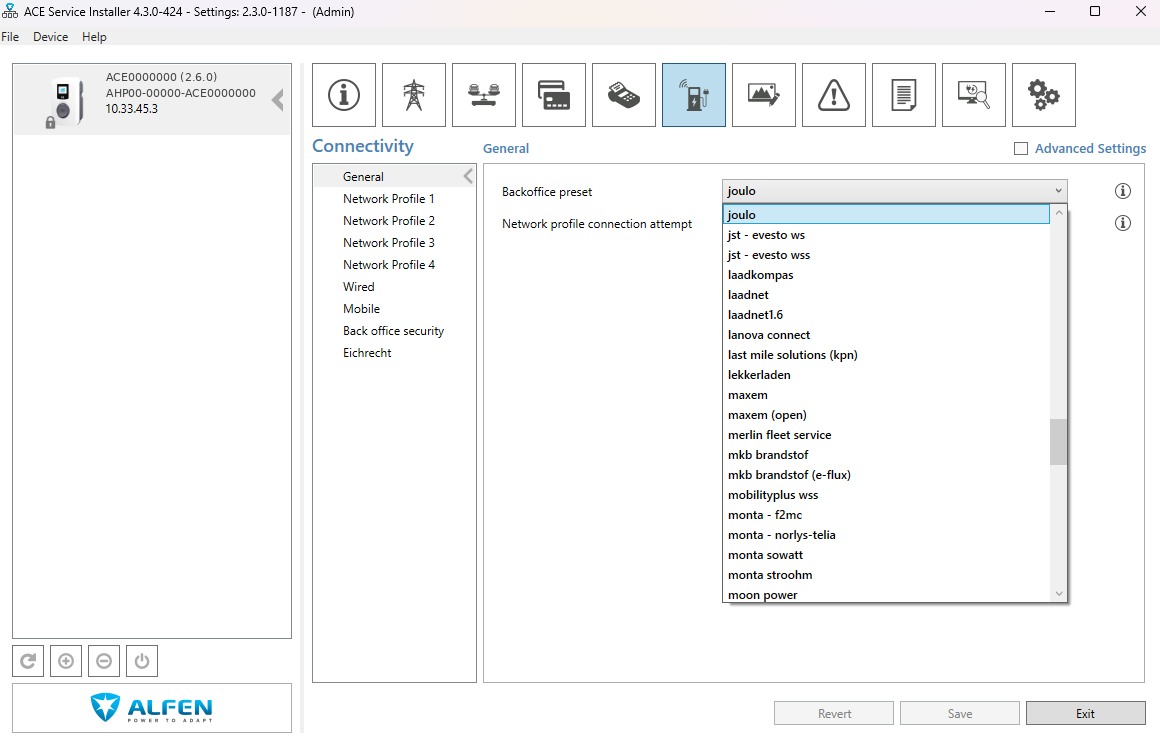
No joulo in the list? Enter the URL yourself (Connectivity tab)
Skip this step if you picked the joulo preset. Go back to Connectivity → General and choose 'Manually enter backoffice settings' under Back office. Open Network Profile 1 and change Priority from Not used to 1 • only then do the OCPP fields appear. Set Protocol to OCPP 1.6 (JSON) and Security Profile to 0. Enter the URL below • nothing after it, your charger appends its own object number.
Manually enter…1OCPP 1.6 (JSON)0 (default)wss://ocpp.joulo.nlSave and restart
Click Save, then click the Power icon at the bottom left of the screen and confirm the restart. The charger restarts and connects to Joulo within a few minutes.
Supported models
Check the exact model and MID meter status before connecting.
| Model | Type | MID meter | Status |
|---|---|---|---|
| Eve Double (alle) | AC | Ja | Compatible |
| Eve Double Plus | AC | Ja | Compatible |
| Eve Double Pro Line | AC | Ja | Compatible |
| Eve Double Pro-line | AC | Ja | Compatible |
| EVE Mini (ICU) | AC | Ja | Compatible |
| Eve Single | AC | Ja | Compatible |
| Eve Single Plus | AC | Ja | Compatible |
| Eve Single Pro-line | AC | Ja | Compatible |
| Eve Single S Pro | AC | Ja | Compatible |
| Eve Single S-line | AC | Ja | Compatible |
| ICU Compact | AC | Ja | Compatible |
| NGU | AC | Ja | Compatible |
| Twin | AC | Ja | Compatible |
| Twin 5 | AC | Ja | Compatible |
| Twin 5 Plus | AC | Ja | Compatible |
FAQ
Need help installing your Alfen Single Pro?
Get a free callback and we walk you through it, or let Joulo come on-site for EUR 150 installation help.
Ready to connect your Alfen?
Start the connection wizard and choose 50five, Eneco or OCPP.
Connect charger